


Quick answer
A systems audit is a short look at how the work actually gets done. It shows where the business still runs through you and what to build first. Week one, watch the work. Week two, name the owners and the tools. Week three, write the missing processes. Week four, decide the first three things to build. If the only person who can explain how the work gets done is you, the audit has found its starting point.
What a systems audit is
A short, honest look at how the work really gets done, so you know what to build first.
Most owners know something’s wrong but not exactly where. Things slip, the same problems come back, and the business slows down when they step away. An audit turns that feeling into a list: which processes exist, who owns them, where they live, and which ones still depend on you.
It isn’t a consultant’s report or a software review. It’s four weeks of watching the work, writing down what you find, and deciding what to fix. You can run it yourself, with your team, or with outside help.
Who should run it
Someone close enough to see the real work, and honest enough to write down what they find.
Whoever runs it, the team should know why it’s happening: to find what’s stuck and fix the process, not to judge people. People show you the real work when they know it’s safe to.
What to check
Five things show how the business really runs.
The processes that stop when you’re unavailable.
The clearest sign of where the business still runs through you.
The numbers the team looks at every week.
Is there a KPI dashboard? Does anyone own each number? Is it reviewed on a fixed day?
The tools the work actually lives in.
Not the software you pay for, the places work really happens: inboxes, spreadsheets, sticky notes, someone’s head.
The owners of each core process.
One role per process. Shared ownership usually means no ownership.
The exceptions only you know how to fix.
The odd customer, the tricky supplier, the workaround that lives in your memory.
The 30-day plan, week by week
Watch, name, write, decide: one step per week.
Week 1: watch the work.
Follow the core processes from start to finish: a sale, an order, a delivery, an invoice. Write down every place work stops when you aren’t there.
Week 2: name the owners and the tools.
For each process, write down who owns it and where the work lives. Mark the gaps: no owner, two owners, or no clear place.
Week 3: write the missing processes.
One page each, using a one-page SOP. Start with the ones that stop without you.
Week 4: decide what to build first.
Rank what you found by how much time it costs you and how much risk it carries. Pick the first three.
Keep everything to one page per process. If writing the processes feels like the hard part, the free SOP template gives you the format and a filled example.
The one-page SOP template
The format from this guide, ready to fill in. Works in Word and Google Docs.
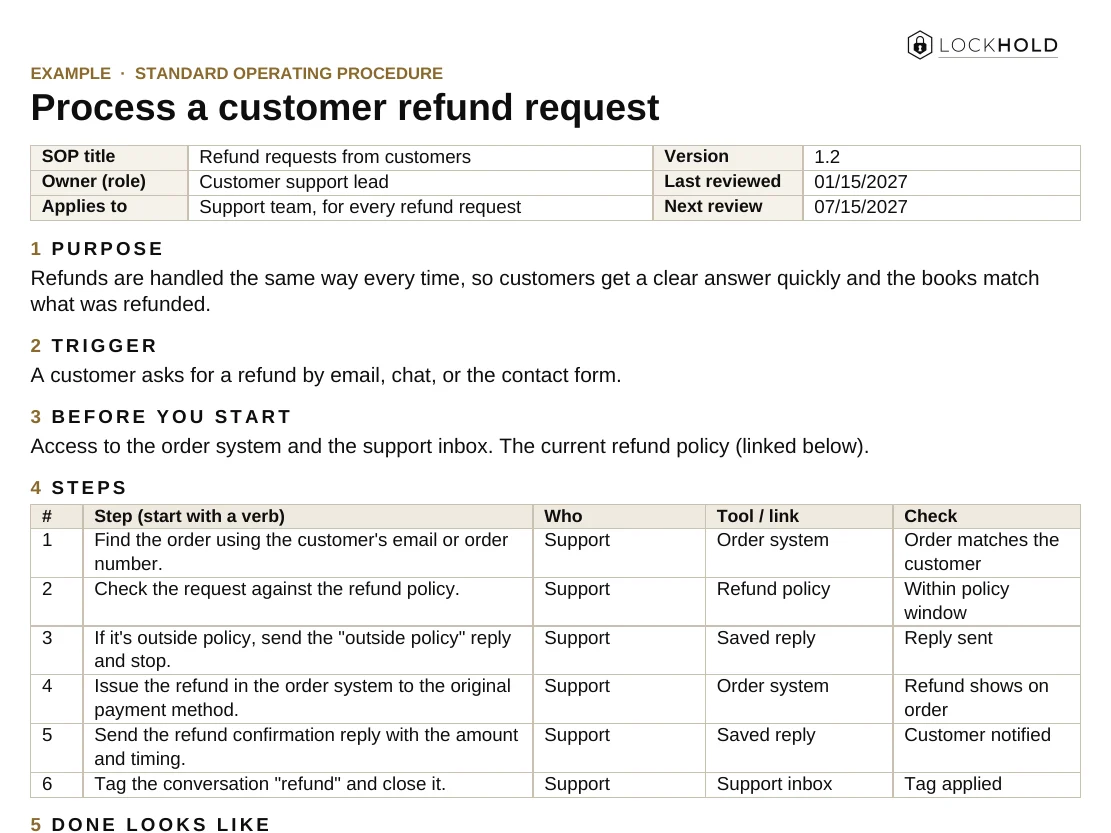
- One page per task: purpose, trigger, steps, who, tools, and what “done” looks like.
- Built-in upkeep: an owner, a review date and a change log.
- A worked example: a customer refund request, filled in.
Here's your SOP template.
We also emailed you a copy, and you’ll get our monthly operator note. Unsubscribe any time.
That didn't go through. Please try again, or email hello@lockhold.com.
What you should have at the end
If you don’t have these five things, the audit isn’t finished.
A list of what still runs through you.
Every process that stops when you’re unavailable.
The owners.
One role named for each core process.
The tools.
Where each process lives, and who has access.
The first three things to build.
Ranked, with a reason for each.
A clear next step.
Who starts the first build, and by when.
Choosing what to build first
Start with what costs you the most time and carries the most risk.
Common mistakes
Auditing how it’s supposed to work, and stopping at the list.
Auditing the org chart, not the work.
Follow real orders and real customers.
Blaming people instead of processes.
If it breaks, the process isn’t finished.
Buying software first.
A tool can’t fix a process nobody has defined.
Stopping at the list.
The audit is only worth something if the first build starts the week after.
The 30-Day Systems Audit
What to check first, and where the business still runs through you. One page, ready to print or share with your team.
Your guide is ready.
We also emailed you a link to your library, so you can come back to it from any device.
That didn't go through. Please try again, or email hello@lockhold.com.
FAQ
What is a business systems audit?
A short review of how the work actually gets done: which processes exist, who owns them, where they live, and which ones still depend on the owner. The result is a ranked list of what to build first.
Can I run a systems audit myself?
Yes. You need about an hour a day for four weeks and the honesty to write down what you find. An outside operator helps when you’re too close to the work to see it, or don’t have the time.
How is a systems audit different from an operations assessment?
Mostly scope and output. A systems audit stays practical: it ends with a short list of what to build and who owns it, not a long report.
What should I do after the audit?
Start the first build the following week. Write the process, name the owner, train it until it holds, and step out of it. Then move to the next one.
Want it built and running?
Pick one process that stops when you’re not available. Write it down and name the owner. That’s the start of the audit. Then move to the next one.
If you’d rather have it done with you, that’s where operations consulting starts: we find what’s stuck, then build it. See also Systems & SOPs.
Related guides and work
Everything still runs through me
The signs, what should stay with the owner, and what to hand off first.
Read the guide GuideHow to write an SOP your team actually uses
What an SOP is, how to write one step by step, and how to get your team to follow it.
Read the guide ServiceOperations consulting
We find where the business is stuck, then build the processes and systems that fix it.
Read →