


Quick answer
Process mapping is writing down how the work actually moves from start to finish. It’s the step before you fix or automate anything. Start with the trigger, write every step, name the role that does each one, and note where it waits and where it breaks. Keep it to one page. Then fix the waits, the breaks and the steps only you can do. If you can’t map it, you can’t improve it.
What process mapping is
Writing down how the work actually moves, from the moment it starts to the moment it’s done.
Most processes in a small business were never designed. They grew: someone did it one way, someone else added a step, a workaround became the rule. A process map puts that on paper so everyone can see it, including the waits, the double handling and the steps that depend on one person.
A map isn’t the same as an SOP. The map shows the whole flow across people: who hands what to whom. An SOP is the step-by-step for one task inside it. You map first to see what’s wrong, then write SOPs for the steps that need them.
You don’t need special software. A whiteboard, sticky notes or a single page in a doc is enough. What matters is that it shows the work as it really happens.
What to map first
The process that costs you the most: in your time, in errors, or in customers.
The process that stops when you’re not available.
The clearest sign of where the business still runs through you.
The process you explain more than once.
If you keep explaining it, it isn’t written down.
The process that produces the most errors.
Wrong orders, missed invoices, rework.
The process that touches the most customers.
Quotes, orders, delivery, support: problems here are felt outside the business.
Pick one. Mapping everything at once turns into a project nobody finishes. One process mapped and fixed beats ten half-mapped.
How to map one process
Trigger, steps, roles, waits, breaks. On one page.
Start with the trigger.
What starts the process: a customer order, a phone call, the first of the month.
Write every step.
In order, in plain words, as it actually happens today. Include the workarounds.
Name the role for each step.
A role, not a person’s name: sales, warehouse, office manager, owner.
Note where it waits.
Every place the work sits in an inbox, on a desk or in a queue, and roughly for how long.
Note where it breaks.
Where mistakes happen, where things get lost, where someone has to chase.
Mark the end.
What “done” looks like: the order delivered, the invoice paid.
Map it with the people who do the work, not from your desk. Walk through a real recent example from start to finish. People will tell you the steps that never made it into anyone’s description of the job. Keep it to one page. If it takes more, split it into two processes.
An example: a custom order, quote to delivery
A simple map of a typical order process. Yours will look different; the format is the point.
On one page, the problems are obvious: two waits on the owner and the inbox, one retyping step, and two handoffs nobody owns. That’s the fix list.
What to do with the map
Fix the steps only you can do, the waits and the breaks. Then decide what to automate.
Then write the fixed version down. Each step that needs instructions gets an SOP. the free SOP template gives you the one-page format and a filled example. To map the whole business rather than one process, run a 30-day systems audit.
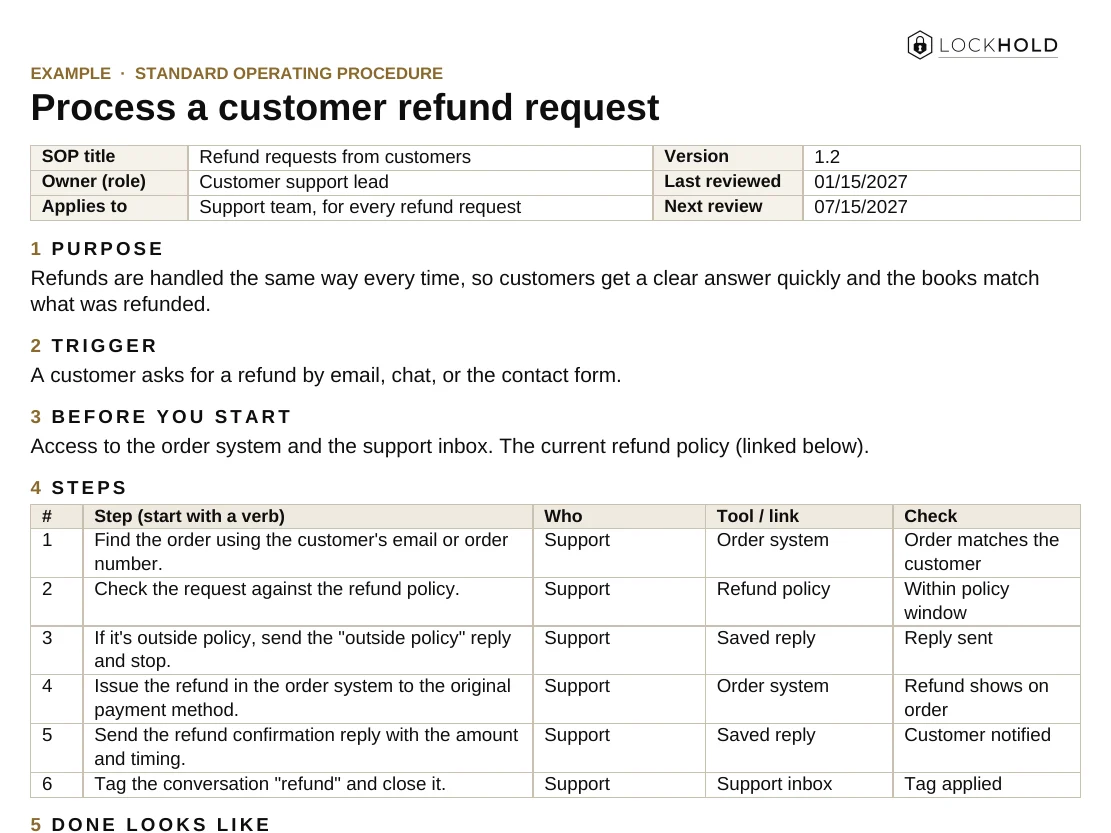
The one-page SOP template
The format from this guide, ready to fill in. Works in Word and Google Docs.
- One page per task: purpose, trigger, steps, who, tools, and what “done” looks like.
- Built-in upkeep: an owner, a review date and a change log.
- A worked example: a customer refund request, filled in.
Here's your SOP template.
We also emailed you a copy, and you’ll get our monthly operator note. Unsubscribe any time.
That didn't go through. Please try again, or email hello@lockhold.com.
Map before you automate
Don’t automate a process you haven’t mapped. You’ll just make the mess faster.
Automation repeats whatever you give it. If the process has an unnecessary step, a wait nobody owns or a rule that only lives in your head, automating it bakes those problems in. Map it, fix it, run it by hand for a few weeks until it holds, then automate the repetitive, rules-based steps.
The map also shows you where automation pays: the retyping, the copy-paste between tools, the status updates people chase by email. Our guide on how to automate business processes covers where to start.
Process Mapping for Small Business
Write down how the work really moves before you fix or automate it. One page, ready to print or share with your team.
Your guide is ready.
We also emailed you a link to your library, so you can come back to it from any device.
That didn't go through. Please try again, or email hello@lockhold.com.
FAQ
What is process mapping?
Writing down how a piece of work actually moves from start to finish: what triggers it, every step, who does each step, and where it waits or breaks. It’s the step before you fix or automate a process.
What is the difference between a process map and an SOP?
A process map shows the whole flow across people and handoffs. An SOP is the step-by-step instructions for one task within that flow. Map first, then write SOPs for the steps that need them.
What tools do I need for process mapping?
None to start. A whiteboard, sticky notes or one page in a doc works. Flowchart software helps later, but the value is in walking through the real work with the people who do it.
Which process should I map first?
The one that stops when you’re unavailable, the one you explain most often, the one with the most errors, or the one that touches the most customers. Pick one and finish it.
Want it built and running?
Pick one process. Write the trigger and every step. Name the roles. Note where it waits and where it breaks. That’s the map. Then decide what to fix.
If you’d rather have the mapping, the fixes and the written processes done with you, that’s our Systems & SOPs work: processes mapped, written and handed over running.
Related guides and work
How to write an SOP your team actually uses
What an SOP is, how to write one step by step, and how to get your team to follow it.
Read the guide GuideThe 30-day systems audit
What to check, a week-by-week plan, and how to decide what to build first.
Read the guide ServiceSystems & SOPs
Processes mapped, written down and owned, so the work runs the same way every time.
Read →