


Quick answer
Vendor management is the system for choosing, onboarding and reviewing the companies that supply your business. Keep one list with what each vendor supplies, the contract and renewal date, one owner for the relationship, how you measure them, and what happens if they fail. Review it once a quarter. If only one person knows how a vendor works, the relationship isn’t managed.
What vendor management is
The system for choosing, onboarding and reviewing the companies that supply your business.
In most small businesses, vendor relationships live with whoever set them up. One person knows the pricing, the contact, the lead times and the workarounds. That works until they’re out, the vendor raises prices at renewal, or a shipment doesn’t show up.
Vendor management turns those relationships into something the business owns: written down, reviewed, and owned by a named person, with a plan if a vendor fails. Suppliers, manufacturers, software, shipping, a 3PL: the same approach applies.
What to track for each vendor
Five things, in one list.
Who they are and what they supply.
Including the contact, lead times and how you order.
The contract and the renewal date.
Terms, pricing, minimums, and when it renews or can be cancelled.
Who owns the relationship.
One person on your team, plus a backup.
How you measure them.
On-time delivery, quality, price, responsiveness. Whatever matters for what they supply.
What happens if they fail.
The backup vendor, the safety stock, or the plan.
A spreadsheet is enough to start. One row per vendor, one column per item above. Put the renewal dates on a shared calendar so they never surprise you.
Choosing a vendor
Decide what good looks like before you compare.
Write down what you need.
Quality, volume, lead time, price range, payment terms.
Get more than one quote.
Compare the total cost, not the unit price: minimums, shipping, payment terms and how they handle problems.
Check them.
References from a business your size, samples or a trial order, and how fast they answer before you’re a customer.
Agree the measures up front.
What on time means, what quality standard applies, and what happens when they miss.
Onboarding a new vendor
Treat it as a process: written once, followed every time.
Add them to the list.
With every item from the tracking list filled in.
Name the owner.
Who places orders, handles problems and reviews them.
Document how you work together.
How to order, who to call, what to check when goods arrive.
Start small.
A trial order or a single product line before you move everything.
Write each of these as a one-page process so the next vendor gets onboarded the same way, by whoever owns it.
The quarterly review
Once a quarter, on a fixed date, go through the list.
Price changes from vendors flow straight into your margins and cash. Put renewals and expected changes into your 13-week cash flow forecast so you see them coming. the free SOP template gives you the format for writing the review down as a repeatable process.
The one-page SOP template
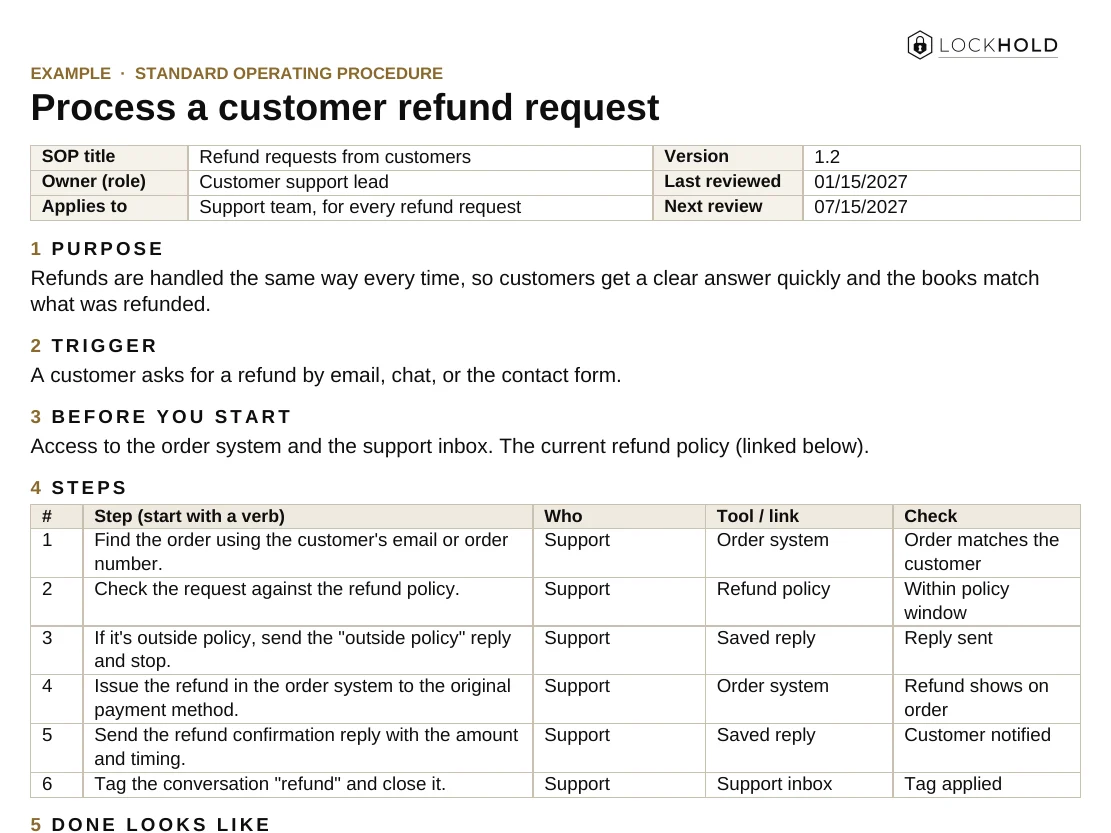
The format from this guide, ready to fill in. Works in Word and Google Docs.
- One page per task: purpose, trigger, steps, who, tools, and what “done” looks like.
- Built-in upkeep: an owner, a review date and a change log.
- A worked example: a customer refund request, filled in.
Here's your SOP template.
We also emailed you a copy, and you’ll get our monthly operator note. Unsubscribe any time.
That didn't go through. Please try again, or email hello@lockhold.com.
When a vendor fails
The owner knows the next step, because it was decided in advance.
Contain it.
Protect the customers first: what’s affected, and what can ship from stock or another source.
Raise it with the vendor.
With the facts and the measures you agreed, and a date for the fix.
Switch if you need to.
If there’s a backup vendor, move the orders. If there isn’t, this is the moment you’ll wish there were.
Review afterward.
What failed, whether it could happen again, and what changes on the list.
The business should always be able to switch if it needs to. A vendor that knows you can’t leave has little reason to improve.
Vendor Management for Small Business
Choose, onboard and review suppliers so the work doesn’t hang on one. One page, ready to print or share with your team.
Your guide is ready.
We also emailed you a link to your library, so you can come back to it from any device.
That didn't go through. Please try again, or email hello@lockhold.com.
FAQ
What is vendor management?
The system for choosing, onboarding and reviewing the companies that supply your business, so each relationship is written down, owned by a named person, measured, and has a backup plan.
How do small businesses manage vendors?
Keep one list with what each vendor supplies, the contract and renewal date, the owner, how they’re measured, and the backup plan. Review it once a quarter on a fixed date.
How often should I review my vendors?
Once a quarter works for most small businesses, with an extra check before any contract renews. Critical suppliers may need a monthly look at on-time delivery and quality.
What should I do if a supplier keeps failing?
Raise it with the facts and the measures you agreed, set a date for the fix, and qualify a backup at the same time. If it doesn’t improve by the date, move the work.
Want it built and running?
List your vendors. Name one owner for each. Put the renewal dates in one place. That’s the start. Then mark the ones with no backup.
If you want the supply side built and run with you, that’s our supply chain & manufacturing work: suppliers, manufacturers, quality and importing, run end to end.
Related guides and work
What is a 3PL, and when should you use one?
What a 3PL does, in-house vs outsourcing, how 3PLs charge, and what to check before you sign.
Read the guide GuideHow to write an SOP your team actually uses
What an SOP is, how to write one step by step, and how to get your team to follow it.
Read the guide ServiceSupply chain & manufacturing
Manufacturers, suppliers, quality, and importing, run end to end.
Read →