


Quick answer
Documenting a business means writing down how the work gets done so someone else can run it without asking you. It isn’t a binder. It’s the core processes, the owner of each one, the tools the work lives in, the numbers that get reported, and how exceptions get fixed. Start with the process you explain most often. Write it on one page, name the role that owns it, put it where the work happens, and stop explaining it.
Why documenting the business matters
Until it’s written down, the business only runs with the people who carry it in their heads.
Most small businesses run on memory: the owner’s, and a few key people’s. That works until someone is out sick, leaves, or the business grows past what a few people can hold. Then the same questions come back to the owner, mistakes repeat, and training a new person means weeks of shadowing.
Documentation moves that knowledge into something the business owns. It’s what lets you hand off work, bring people on faster, step away, and eventually sell a business that runs without you.
What to document
The processes, the owners, the tools, the numbers and the exceptions.
The core processes.
How work starts, moves and finishes: a sale, an order, a delivery, an invoice.
The owners.
Which role is responsible for each process. See who owns what.
The tools.
Where the work lives, who has access, and how the team uses each one.
The numbers.
What gets reported, how often and to whom. A KPI dashboard makes this one screen.
The exceptions.
What usually breaks, and how it gets fixed. The rules that live in your head.
How to document it
One process at a time, starting with the ones you explain most.
Start with the processes you explain more than once.
And the ones that still runs through you. Every repeat is a sign it isn’t written down.
Write one process at a time.
One page. Steps that start with a verb. If it needs more than a page, split it. If you’re not sure where it starts and ends, sketch a process map first.
Name the role, not the person.
So it survives someone leaving.
Add the decision rules.
When to escalate, what limits apply, and what to do in the common exceptions.
Review it with the person who will own it.
Have them follow it while you watch. Fix what’s unclear. Then stop explaining it.
For the format of each page, see our guide on how to write an SOP.
Where it should live
Where the work happens, not in a folder nobody opens.
A process written in a document nobody can find is the same as a process that isn’t written. Put each one where the person doing the work will see it: linked from the tool they use, pinned in the team’s shared space, or printed at the station where the work is done.
Keep one simple index: every process, its owner and where it lives. That index is the start of an operations manual, without the binder. the free SOP template gives you a one-page format and a filled example to copy.
The one-page SOP template
The format from this guide, ready to fill in. Works in Word and Google Docs.
- One page per task: purpose, trigger, steps, who, tools, and what “done” looks like.
- Built-in upkeep: an owner, a review date and a change log.
- A worked example: a customer refund request, filled in.
Here's your SOP template.
We also emailed you a copy, and you’ll get our monthly operator note. Unsubscribe any time.
That didn't go through. Please try again, or email hello@lockhold.com.
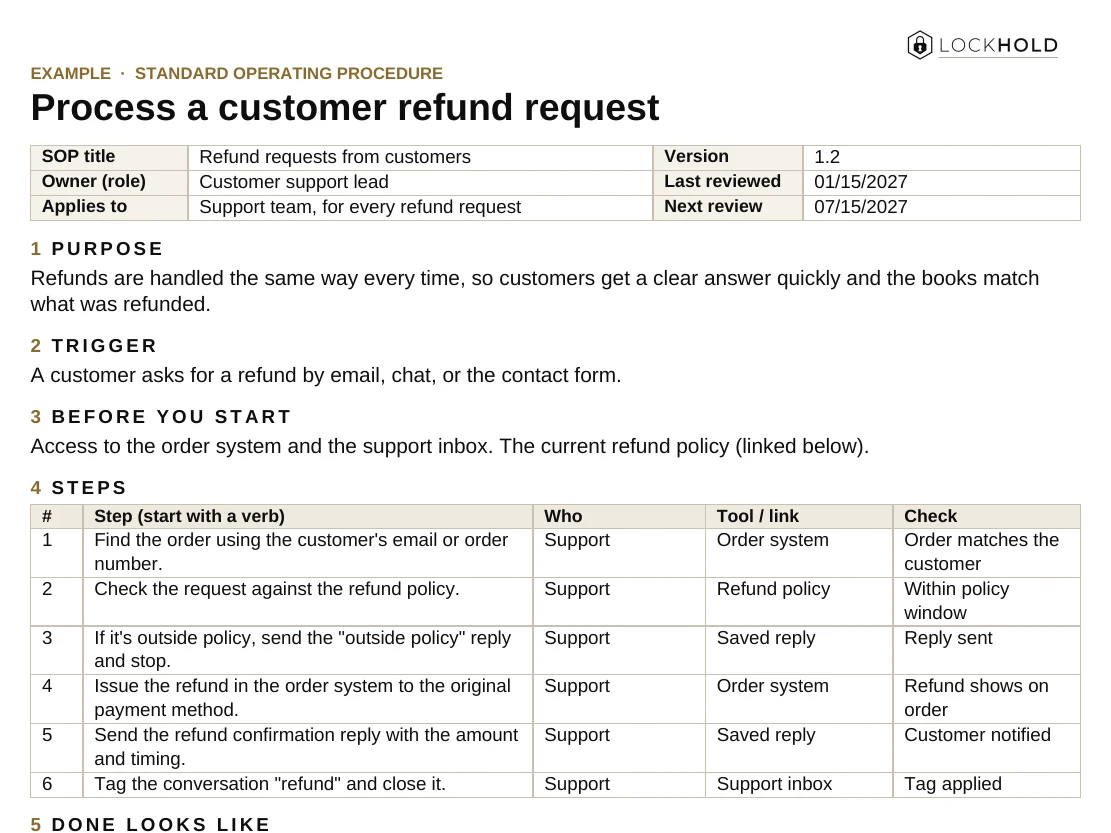
What good documentation looks like
Someone who has never done the work can follow it, and the owner can update it without you.
If the only place a process lives is in your head, it isn’t documented. Write it down.
Keeping it current
The owner updates it when the work changes. Review the list once a quarter.
Documentation goes stale when the work changes and the page doesn’t. Make the owner of each process responsible for its page, and fix the page whenever someone hits a step that’s wrong. Once a quarter, run down the index and check every process still has an owner and still matches the work. Our guide on how to delegate covers handing each one off once it’s written.
How to Document a Business So Someone Else Can Run It
Not a binder: the processes, owners and tools someone else needs. One page, ready to print or share with your team.
Your guide is ready.
We also emailed you a link to your library, so you can come back to it from any device.
That didn't go through. Please try again, or email hello@lockhold.com.
FAQ
How do you document a business?
Write down the core processes one at a time, one page each, with steps that start with a verb. Name the role that owns each process, note the tools and the numbers, and put each page where the work happens.
What should be in a small business operations manual?
The core processes, the owner of each, the tools and where the work lives, the numbers that get reported, and how common exceptions are handled. A simple index of all of them is more useful than a thick binder.
Where should I start documenting my business?
With the process you explain most often, or the one that stops when you’re unavailable. Write that one first, hand it to its owner, then move to the next.
How long does it take to document a business?
It depends on how many core processes you have and how much lives in people’s heads. Write a few at a time, starting with the ones that cost you the most, and let each one get used for a week or two before you call it done.
Want it built and running?
Pick the one process you explain most often. Write it. Name the owner. Put it where the work happens. Then move to the next one.
If you want the processes written, owned and handed over with you, that’s our Systems & SOPs work.
Related guides and work

How to write an SOP your team actually uses
What an SOP is, how to write one step by step, and how to get your team to follow it.
Read the guide Guide
Process mapping for small business
What to map first, how to map one process on one page, and what to fix before you automate.
Read the guide Service
Systems & SOPs
Processes mapped, written down and owned, so the work runs the same way every time.
Read →